
Explore real image-to-video examples with source images, finished clips, motion prompts, model names, duration, and output settings.
Cozy cat scene
Hailuo 2.3 · 6 seconds · 768p
Fantasy character
Hailuo 2.3 · 6 seconds · 768p
Futuristic hallway
Hailuo 2.3 · 6 seconds · 768p
Stage performance
Hailuo 2.3 · 6 seconds · 768p
Temple environment motion
Grok Imagine Video 1.0 · 5 seconds · 720p · 16:9
Image to Video Examples
These examples show the relationship between a source image, a motion brief, and a finished AI video. They are useful as planning references, not promises that every image will produce the same result. Output quality depends on the selected model, source-image quality, prompt clarity, and the settings available for that run.
Open the Image to Video generator
How to read an example
Each example includes a source image, a completed clip, the motion brief used for the task, and the recorded model and output settings. Start with the visual direction already present in the source image. Then describe what should move, what should remain stable, and how the camera should behave.
Cozy cat scene

Model: Hailuo 2.3
Recorded output: 6 seconds, 768p
Motion brief: Gentle rain streaks on the window, subtle breathing, blinking city lights, soft ambient camera drift, and a warm emotional atmosphere.
Why it works: the subject is already clearly separated from the background, while the requested motion is small and environmental rather than a large identity change.
Fantasy character reveal

Model: Hailuo 2.3
Recorded output: 6 seconds, 768p
Motion brief: Natural cape movement, subtle breathing, distant lightning, moving storm clouds, and a slow cinematic push-in.
Why it works: the prompt separates character motion, wardrobe motion, background atmosphere, and camera motion instead of asking for a vague “epic animation.”
Futuristic hallway tracking shot

Model: Hailuo 2.3
Recorded output: 6 seconds, 768p
Motion brief: A slow forward tracking camera, moving reflections on metallic surfaces, gentle haze drift, and controlled lighting pulses.
Why it works: a single camera direction gives the model a clear composition goal, while reflections and haze provide motion without changing the architecture.
Stage performance clip

Model: Hailuo 2.3
Recorded output: 6 seconds, 768p
Motion brief: Energetic camera movement, subtle dance motion, hair and clothing reacting to the beat, flashing cyber lights, and a polished short-video finish.
Why it works: the brief names the controllable motion layers separately, helping avoid an over-specified prompt that asks every part of the frame to change at once.
Temple environment motion
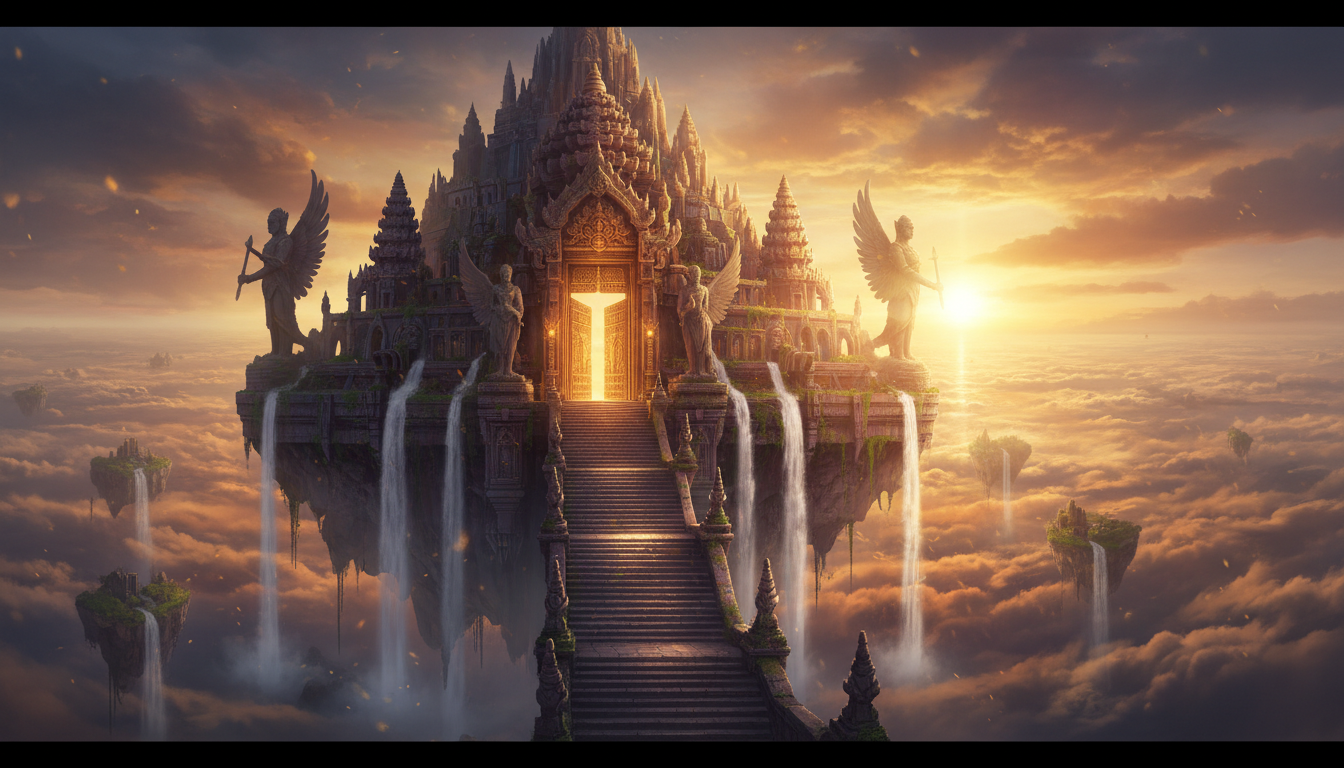
Model: Grok Imagine Video 1.0
Recorded output: 5 seconds, 720p, 16:9
Motion brief: Slow cinematic aerial motion, drifting golden mist, moving cloud layers, flowing waterfalls, soft rays, and restrained environmental motion.
Why it works: it treats the scene as an environment. The prompt emphasizes atmosphere and camera movement instead of inventing a new foreground subject.
What these examples do not prove
These examples do not establish a universal quality guarantee, a universal commercial-use right, a watermark policy, or a fixed generation time for every model. Review the selected model’s visible controls, price, plan eligibility, and provider terms before submitting a task.
Build your own motion brief
Use this four-part structure:
- Camera movement: slow push-in, pan, orbit, tracking shot, or static camera.
- Subject motion: breathing, walking, turning, fabric movement, product rotation, or no subject movement.
- Environment motion: rain, fog, water, cloud layers, reflections, lights, or particles.
- Preservation instruction: keep the face, product label, architecture, composition, or illustration style stable.
Continue with a specific workflow
- Learn the reusable image-to-video prompt structure.
- Plan an ad draft with product image to video.
- Start a subtle portrait or illustration workflow with the AI image animator.
- For family and archive material, read the guide to animate old photos with AI.